 Untilfree
How to Add a Retirement Countdown Widget
A widget keeps your countdown on the home screen, so you see the days left every time you unlock your phone. Here is how to add the Untilfree widget on iPhone and Android, what each size shows and what to do if it is blank.
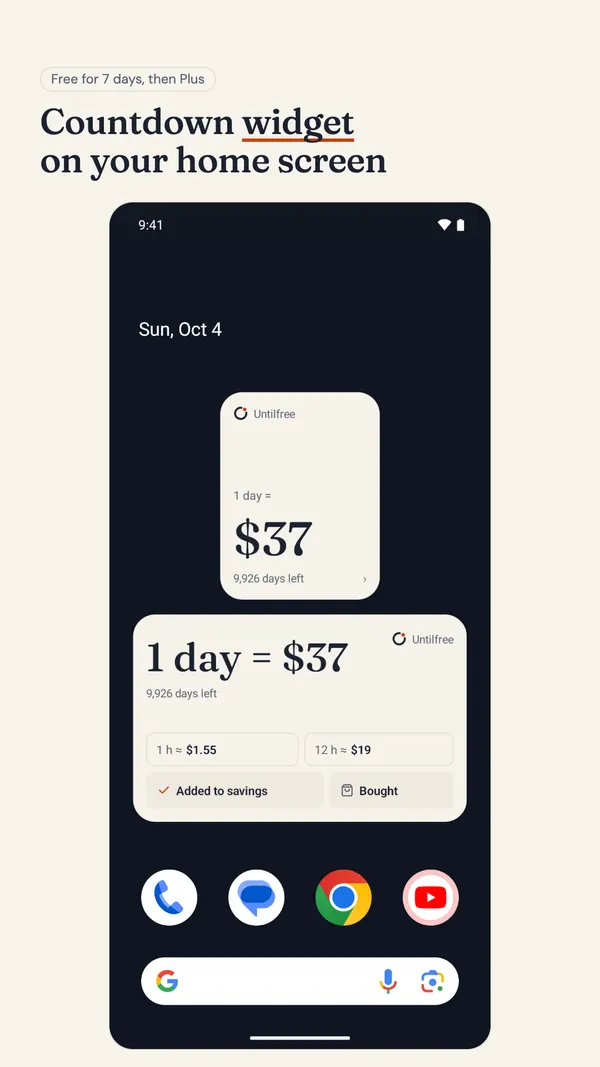
What the widget shows
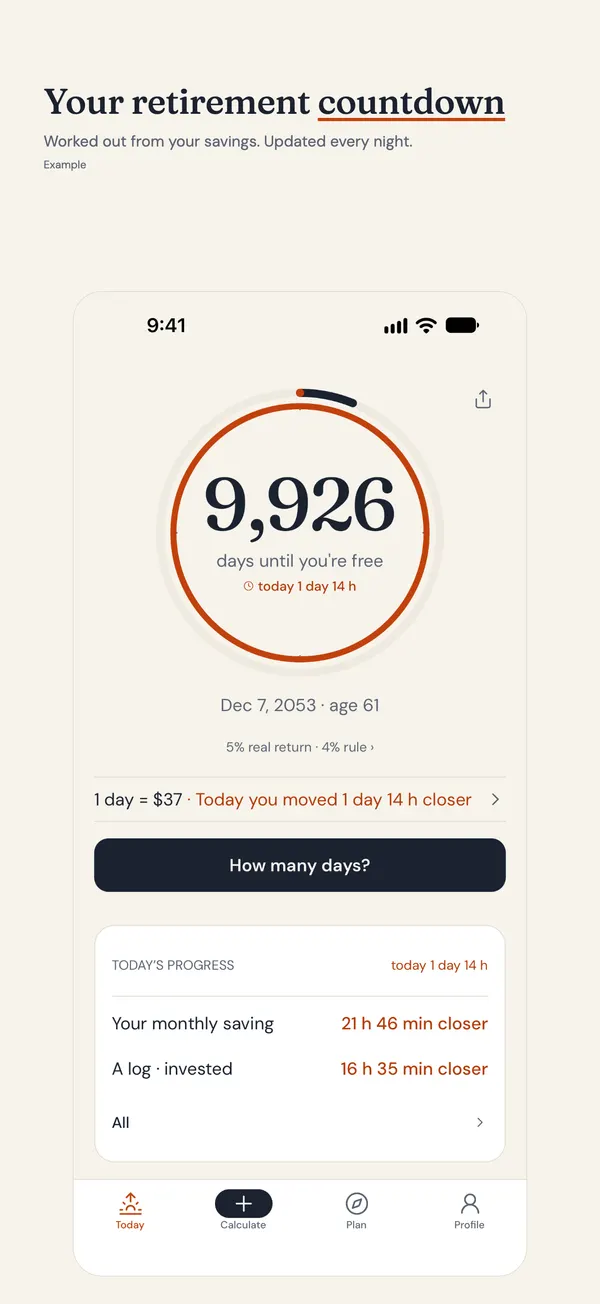
The Untilfree widget counts down to your freedom day, the date your savings could pay your bills. That date comes from your own numbers, so it moves when you save more or spend less. Depending on the size, it shows:
- Small: the days left and what one day of freedom costs.
- Medium: the price of a day, what an hour of it costs, and shortcuts into the app.
- iPhone lock screen: a circle, a rectangle or a single line of text next to the clock with the days left.
The widget never shows your savings total, so it is safe on a screen other people can see.
Before you start
- Install Untilfree from the App Store or Google Play.
- Open it once and enter your four numbers: age, savings, monthly investing and monthly spending. Until you do, the widget only says “Set up Untilfree”.
Add it to the iPhone home screen
- Touch and hold an empty part of the home screen until the apps jiggle.
- Tap Edit in the top corner, then Add Widget.
- Search for Untilfree and tap it.
- Swipe to choose the small or medium size, then tap Add Widget.
- Drag it where you want it and tap Done.
Add it to the iPhone lock screen
- Lock your phone, then touch and hold the lock screen and tap Customize.
- Choose Lock Screen, then tap the widget area under the clock (or the line above it for the text version).
- Find Untilfree in the list and tap the circular or rectangular widget.
- Tap Done.
Add it to an Android home screen
- Touch and hold an empty part of the home screen.
- Tap Widgets.
- Scroll or search to Untilfree.
- Touch and hold the 2×2 (small) or 4×2 (medium) widget and drop it on the screen.
Menus differ a little between phone makers, but every Android launcher has a widgets list reached by holding the home screen.
If the widget is blank or out of date
- “Set up Untilfree”: open the app and finish entering your numbers.
- “Unlock with Plus”: widgets are free for the first 7 days, then part of Untilfree Plus.
- The number hasn’t changed: open the app once. Phones refresh widgets on their own schedule to save battery, so a change can take a little while to show.
- Not in the list: restart the phone after installing. On Android, check the app is not on a battery-restricted list.
What it costs
Untilfree is free to download and contains ads. The widgets are free for your first 7 days. After that they are part of Plus, a yearly plan with a free trial or a one-time purchase; the price is shown in your store. Plus also removes ads.
Can I do it without an app?
Partly. You can add an event on your retirement date to your calendar and use the calendar widget, or use a general countdown widget app. Both count to a date you pick. They will not move the date when your savings change, which is the point of counting down to money rather than to an age. If an age is what you want, the days until retirement calculator gives you the date to put in.
Sam put the small widget next to his banking app. Every time he opens it he sees that a day of freedom costs him about $110. He says it is the only budget reminder he hasn’t learned to ignore.
Questions people ask
Is there a retirement countdown widget for iPhone?
Yes. Untilfree has small and medium home screen widgets and three lock screen widgets (circle, rectangle and one line of text) that show your days left.
Does the Android widget work on the lock screen?
No. On Android, Untilfree has 2×2 and 4×2 home screen widgets. Lock screen widgets are on iPhone.
Why does my widget say Unlock with Plus?
Widgets are free for the first 7 days after you install. After that they are part of Untilfree Plus, a yearly plan with a free trial or a one-time purchase.
Does the widget show how much money I have?
No. It shows the days left and the price of one day of freedom, never your savings total.
How often does the countdown update?
The count is worked out again every night, and your phone refreshes the widget through the day. If you change your numbers, open the app once to update it straight away.
Your countdown, on the home screen
Untilfree counts down to the day your savings could pay your bills. The widget keeps that number where you will see it.
- Small and medium home screen widgets
- iPhone lock screen widgets
- Free for 7 days, then part of Plus
App Store · Google Play · Free · Ads, optional Plus · No account · No bank link
Estimates in today’s money (after inflation). Taxes, fees and state pensions are not included. This page is general information, not investment advice.
Published · by Srofia